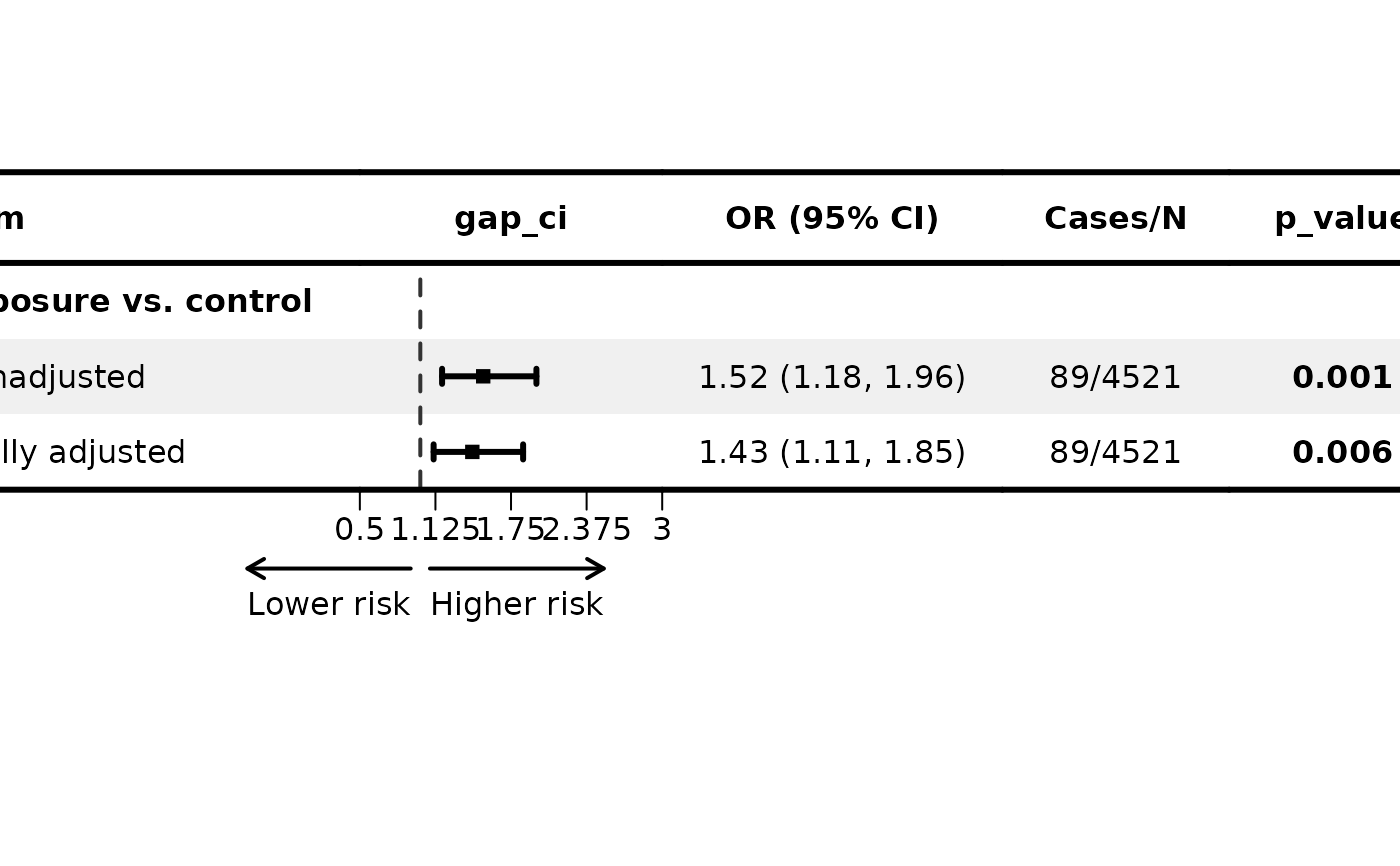
Produces a publication-ready forest plot with UKB-standard styling.
The user supplies a data frame whose first column is the row label
(item), plus any additional display columns (e.g. Cases/N).
The gap column and the auto-formatted OR (95% CI) text column are
inserted automatically at ci_column. Numeric p-value columns
declared via p_cols are formatted in-place.
Usage
plot_forest(
  data,
  est,
  lower,
  upper,
  ci_column = 2L,
  ref_line = 1,
  xlim = NULL,
  ticks_at = NULL,
  arrow_lab = c("Lower risk", "Higher risk"),
  header = NULL,
  indent = NULL,
  bold_label = NULL,
  ci_col = "black",
  ci_sizes = 0.6,
  ci_Theight = 0.2,
  ci_digits = 2L,
  ci_sep = ", ",
  p_cols = NULL,
  p_digits = 3L,
  bold_p = TRUE,
  p_threshold = 0.05,
  align = NULL,
  background = "zebra",
  bg_col = "#F0F0F0",
  border = "three_line",
  border_width = 3,
  row_height = NULL,
  col_width = NULL,
  save = FALSE,
  dest = NULL,
  save_width = 20,
  save_height = NULL,
  theme = "default"
)
Arguments
- data
data.frame. First column must be the label column (
item). Additional columns are displayed as-is (character) or formatted if named inp_cols(must be numeric). Column order is preserved.- est
Numeric vector. Point estimates (
NA= no CI drawn).- lower
Numeric vector. Lower CI bounds (same length as
est).- upper
Numeric vector. Upper CI bounds (same length as
est).- ci_column
Integer. Column position in the final rendered table where the gap/CI graphic is placed. Must be between
2andncol(data) + 1(inclusive). Default:2L.- ref_line
Numeric. Reference line. Default:
1(HR/OR). Use0for beta coefficients.- xlim
Numeric vector of length 2. X-axis limits.
NULL(default) usesc(0, 2).- ticks_at
Numeric vector. Tick positions.
NULL(default) = 5 evenly spaced ticks acrossxlim.- arrow_lab
Character vector of length 2. Directional labels. Default:
c("Lower risk", "Higher risk").NULL= none.- header
Character vector of length
ncol(data) + 2. Column header labels for the final rendered table (original columns + gap_ci + OR label).NULL(default) = use column names fromdataplus"gap_ci"and"OR (95% CI)". Pass""for the gap column position.- indent
Integer vector (length =
nrow(data)). Indentation level of the label column: each unit adds two leading spaces. Default: all zeros.- bold_label
Logical vector (length =
nrow(data)). Which rows to bold in the label column.NULL(default) = auto-derive fromindent: rows whereindent == 0are bolded (parent rows), indented sub-rows are plain.- ci_col
Character scalar or vector (length =
nrow(data)). CI colour(s).NArows are skipped automatically. Default:"black".- ci_sizes
Numeric. Point size. Default:
0.6.- ci_Theight
Numeric. CI cap height. Default:
0.2.- ci_digits
Integer. Decimal places for the auto-generated
OR (95% CI)column. Default:2L.- ci_sep
Character. Separator between lower and upper CI in the label, e.g.
", "or" - ". Default:", ".- p_cols
Character vector. Names of numeric p-value columns in
data. These are formatted top_digitsdecimal places with"<0.001"-style clipping.NULL= none.- p_digits
Integer. Decimal places for p-value formatting. Default:
3L.- bold_p
TRUE(bold all non-NA p belowp_threshold),FALSE(no bolding), or a logical vector (per-row control). Default:TRUE.- p_threshold
Numeric. P-value threshold for bolding when
bold_p = TRUE. Default:0.05.- align
Integer vector of length
ncol(data) + 2. Alignment per column:-1left,0centre,1right. Must cover all final columns (original + gap_ci + OR label).NULL= auto (column 1 left, all others centre).- background
Character. Row background style:
"zebra","bold_label"(shade rows wherebold_label = TRUE), or"none". Default:"zebra".- bg_col
Character. Shading colour for backgrounds (scalar), or a per-row vector of length
nrow(data)(overrides style). Default:"#F0F0F0".- border
Character. Border style:
"three_line"or"none". Default:"three_line".- border_width
Numeric. Border line width(s). Scalar = all three lines same width; length-3 vector = top-of-header, bottom-of-header, bottom-of-body. Default:
3.- row_height
NULL(auto), numeric scalar, or numeric vector (length = total gtable rows including margins). Auto sets 8 / 12 / 10 / 15 mm for top / header / data / bottom respectively.- col_width
NULL(auto), numeric scalar, or numeric vector (length = total gtable columns). Auto rounds each default width up so the adjustment is in \([5, 10)\) mm.- save
Logical. Save output to files? Default:
FALSE.- dest
Character. Destination file path (extension ignored; PNG, PDF, JPG, and TIFF files are saved). Required when
save = TRUE.- save_width
Numeric. Output width in cm. Default:
20.- save_height
Numeric or
NULL. Output height in cm.NULL=nrow(data) * 0.9 + 3.- theme
Character preset (
"default") or aforestploter::forest_themeobject. Default:"default".
Value
A forestploter plot object (gtable), returned invisibly.
Display with plot() or grid::grid.draw().
Examples
df <- data.frame(
  item      = c("Exposure vs. control", "Unadjusted", "Fully adjusted"),
  `Cases/N` = c("", "89/4521", "89/4521"),
  p_value   = c(NA_real_, 0.001, 0.006),
  check.names = FALSE
)

p <- plot_forest(
  data       = df,
  est        = c(NA, 1.52, 1.43),
  lower      = c(NA, 1.18, 1.11),
  upper      = c(NA, 1.96, 1.85),
  ci_column  = 2L,
  indent     = c(0L, 1L, 1L),
  bold_label = c(TRUE, FALSE, FALSE),
  p_cols     = "p_value",
  xlim       = c(0.5, 3.0)
)
plot(p)